
Getting Help and Support
As an AWS Region (Beta) customer, you have access to dedicated support channels to report and address service issues. This document outlines the available support options and process for submitting feedback.
Reporting Issues
The primary method for reporting issues or providing feedback is through our feedback form, accessible via the "Provide Feedback" link in the bottom of the left (vertical) navigation bar.
Submission Process
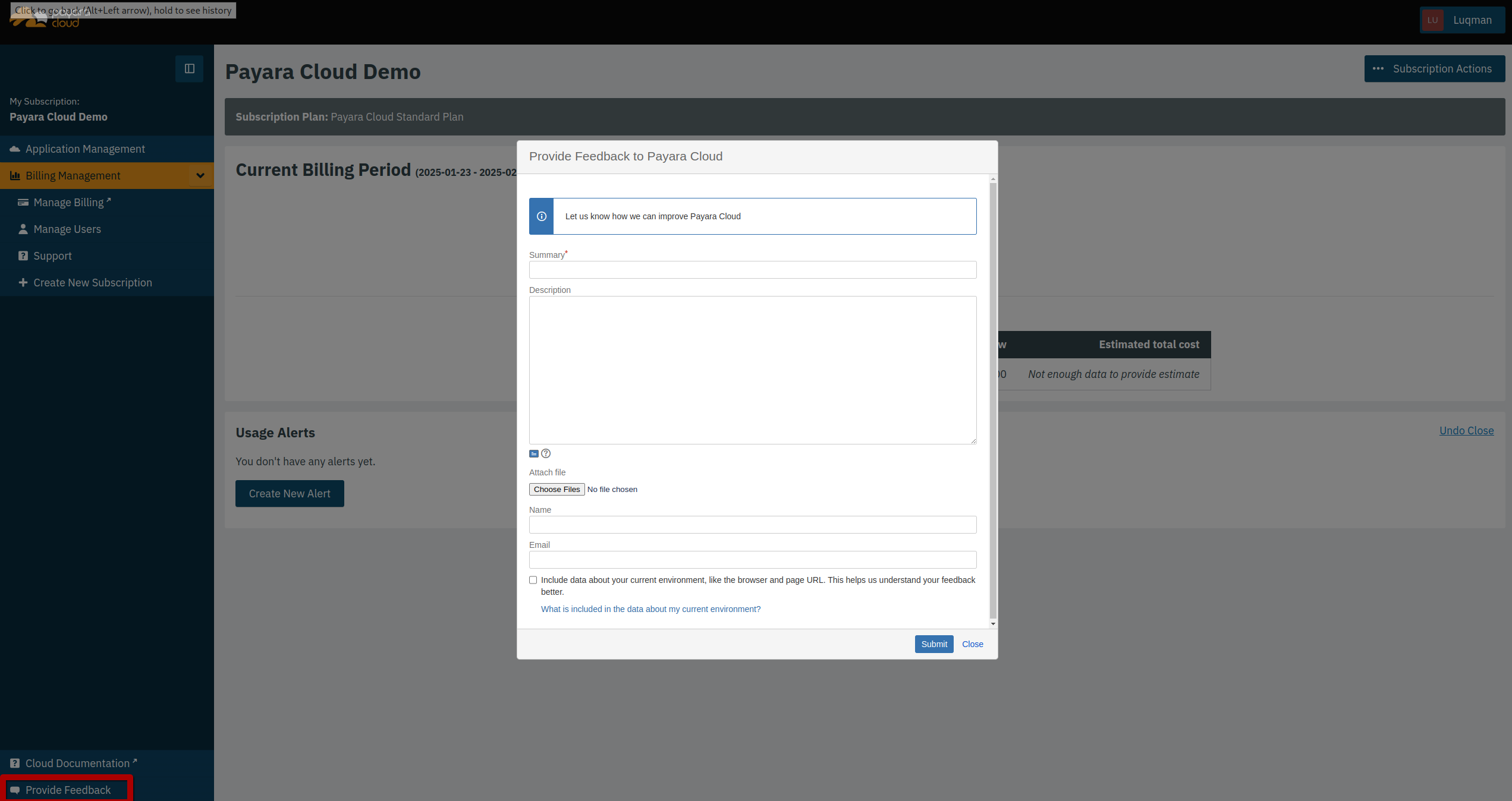
-
Click the "Provide Feedback" button
-
Fill out the required fields:
-
Summary: A brief description of your issue
-
Description: Detailed information about the problem, including:
-
What happened
-
Expected behavior
-
Steps to reproduce
-
Impact on your operations
-
-
Your contact information (name and email)
-
Optional: Attach relevant screenshots or files using the "Attach file" button (image icon)
-
Response Times and Limitations
-
This is a Beta feature. The Feature and user experience is largely complete, tested and stable. AWS Region has configuration and dependencies that are unlikely to change. There is a low risk of data loss. The feature is supported on a commercially-reasonable effort basis, but with the expectation that issues require extra time and assistance from development to troubleshoot.
-
Critical issues affecting service availability receive priority attention
-
General feedback and feature requests are reviewed periodically
-
You may be contacted for additional information if needed
Additional Support Resources
| Documentation |
Access comprehensive service documentation through the left sidebar |
| Regular Updates |
Monitor the service dashboard for known issues and planned maintenance |
| Contact Management |
For urgent matters, reach out to your assigned account manager |
Service Monitoring
While we actively monitor the service, your feedback helps us identify and address issues more quickly. Please report any performance degradation, unexpected behavior, or service disruptions through the feedback form.
|
Keep your contact information current to ensure timely communication about your reported issues. |