Network Listeners
A network listener is a listen socket that has an IP address, port number, protocol,
as well as various other configuration options. A listener can listen on a specific
port on all network interfaces by using the IP 0.0.0.0, and a configured port.
A virtual server will then be used to select a combination of network listeners to
use for an application. For example, Payara Server Community has two default network listeners
for user deployed applications: an insecure listener on port 8080 (http-listener-1),
and a secure listener on port 8181 (http-listener-2).
Configuration
| When configuring network listeners from the admin console, there are some visible configuration options that transparently configure the protocol being used. If a configuration property isn’t shown here but is visible in the admin console, see the page on protocols. |
Existing network listeners can be configured from the admin console or with asadmin commands. The network listener configurations can be found in the admin console under Configurations → your-config → Network Config → Network Listeners.
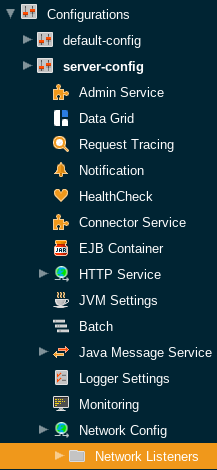
The following fields can be configured for network listeners:
Name
The unique name of the network listener. This cannot be edited from the admin console.
Asadmin Command:
set configs.config.server-config.network-config.network-listeners.network-listener.${network-listener-name}.name=value
Protocol
The protocol used by the network listener. This cannot be edited from the admin console.
Asadmin Command:
set configs.config.server-config.network-config.network-listeners.network-listener.${network-listener-name}.protocol=${protocol-name}
Status
The status of the network listener. This determines whether the listener will be actively listening for requests.
Asadmin Command:
set configs.config.server-config.network-config.network-listeners.network-listener.${network-listener-name}.status=[true/false]
JK Enabled
Whether mod_jk support should be enabled for this listener. Should only be enabled if mod_jk is being
explicitly configured on an Apache Web Server in conjunction with Payara Server Community.
Asadmin Command:
set configs.config.server-config.network-config.network-listeners.network-listener.${network-listener-name}.jk-enabled=[true/false]
JK Configuration File
The location of the mod_jk configuration file. Defaults to ${com.sun.aas.instanceRoot}/config/glassfish-jk.properties.
Asadmin Command:
set configs.config.server-config.network-config.network-listeners.network-listener.${network-listener-name}.jk-configuration-file=/location/to/file
Port
The port used by the network listener. The selected port will be used to listen for requests.
Asadmin Command:
set configs.config.server-config.network-config.network-listeners.network-listener.${network-listener-name}.port=value
Address
The address used by the network listener. 0.0.0.0 corresponds to all addresses.
Asadmin Command:
set configs.config.server-config.network-config.network-listeners.network-listener.${network-listener-name}.address=value
Asadmin Commands
The following asadmin commands are available for administering network listeners instead of using the admin console. The parameters are all explained in the configuration options above.
create-network-listener
The create-network-listener command creates a network listener. It requires an already created transport and protocol.
For more information on creating protocols, see protocols. The parameters are all explained
in the configuration options above.
restart-http-listeners
The restart-http-listeners commands restarts all HTTP listeners but the admin-listener of the targeted instance(s).
It is either used with the --all flag to target all instances or with a particular target instance, deployment group or cluster following the --target parameter.
When target and all parameters are both omitted the default target is the DAS.
When --all is used together with a target the target is ignored and the command affects all instances.
NOTE: This command only restarts all HTTP listeners except the admin-listener. IIOP listeners are not affected and may require a server restart to make changes take effect.
Examples
asadmin> restart-http-listeners --all
asadmin> restart-http-listeners --target FlyingFish
asadmin> restart-http-listeners FlyingFish
asadmin> restart-http-listeners
First line affects all instances, second line affects only instance named FlyingFish, third is a short hand for the second, last is a short hand for restart-http-listeners server or restart-http-listeners --target=server.